


Event detection and notification system for monitoring abnormal conditions and compliance
Modules → Alarms | Tutorial | How-to Guide | Reference
 Alarms Module Overview
Provides the critical event detection and notification layer for FrameworX solutions, enabling operators to respond quickly to abnormal conditions and maintain safe, efficient operations.
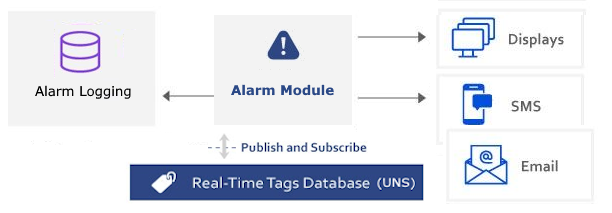
Understanding Alarms in Automation
Industrial processes require continuous monitoring to detect deviations from normal operation. The Alarms Module bridges the gap between raw sensor data and actionable operator responses by:
- Condition Monitoring - Detect when process values exceed safe or optimal ranges
- Event Notification - Alert operators through multiple channels
- State Management - Track alarm lifecycle from detection to resolution
- Compliance Recording - Maintain audit trails for regulatory requirements
Key Concepts
- AlarmItem: Individual condition monitored for alarm generation based on tag values and defined limits
- AlarmGroup: Collection of alarm items sharing common acknowledgment, notification, and logging behaviors
- AlarmArea: Hierarchical organization structure for grouping alarms by location or function
- AuditTrail: Chronological record of system events, operator actions, and alarm occurrences for compliance
What It Does
The Alarms Module provides comprehensive alarm management through:
- Real-Time Evaluation - Continuously monitor tag values against configured conditions
- Intelligent Notification - Multi-channel alerts via sound, visual, email, SMS, or custom methods
- Acknowledgment Workflow - Require operator confirmation of critical alarms
- Hierarchical Organization - Group alarms by area, system, or responsibility
- Historical Logging - Record all alarm events for analysis and compliance
- Deadband Management - Prevent alarm flooding through time and value hysteresis
- Shift-Based Limits - Different alarm thresholds for different operational periods
Configuration Workflow
| Step | Action | Description |
|---|---|---|
| Create AlarmItems | Define conditions | Specify tags and limits to monitor |
| Configure AlarmGroups | Set behaviors | Define acknowledgment and notification |
| Build AlarmAreas | Create hierarchy | Organize by plant structure |
| Set Global Settings | System configuration | Database and audit trail setup |
Runtime Behavior
Alarm States
The module manages alarms through defined state transitions:
- Normal - No alarm condition exists
- Active - Condition detected, awaiting acknowledgment
- Acknowledged - Operator confirmed awareness
- Normalized - Condition cleared, awaiting final acknowledgment
Notification Methods
Alarms trigger notifications based on group configuration:
- Visual indicators on operator displays
- Audible alerts with configurable sounds
- Email and SMS through script integration
- External system interfaces via custom methods
Performance Management
Built-in features prevent alarm system overload:
- Deadbands prevent rapid re-triggering
- Priority levels highlight critical conditions
- Area filtering focuses operator attention
- Acknowledgment requirements ensure awareness
Feature Highlights
Pre-Defined Groups - Critical, Warning, and AuditTrail groups ready to use
FDA Compliance - 21 CFR Part 11 audit trail capabilities
Flexible Database - Support for SQLite, SQL Server, PostgreSQL, and more. 10.1.5 improves reliability of offline buffering so alarm DB writes are reliably preserved through outages and forwarded when connectivity is restored.
Runtime Control - Start, stop, pause alarm evaluation dynamically
Display Integration - AlarmViewer, AlarmArea, and the new Alarm Linear Gauge control for HMI
Script Integration - Custom notification methods via Script Classes
Distributed Architecture - Alarms evaluated centrally, viewed anywhere
- Localization Support - Multi-language alarm messages and displays
→ Modules / Industrial Operations / Alarms Module → Tutorials / Industrial Operations / Alarms Module Tutorial → How-to Guides / Industrial Operations / Alarms Module How-to Guide → How-to Guides / Standard Compliance / FDA-21 CFR 11 Compliance → Technical Reference / Platform Modules / Alarms Module ReferenceAlarms Module Links
Explanation - to understand concepts
Tutorials - to learn by doing
How-to Guides - to accomplish specific tasks
Reference - technical details
In this section...