


Overview
FrameworX is a Unified Automation Platform. It includes all modules and tools for Solutions Development - Unified designer, connectors to data sources, built-in features for Industrial and Business Operations, Client UI technologies.
The platform delivers multi-platform Runtime in various Deployment Scenarios.
FrameworX Core
FrameworX kernel is designed upon the concepts of Real-Time In-Memory Database and Unified Namespace.

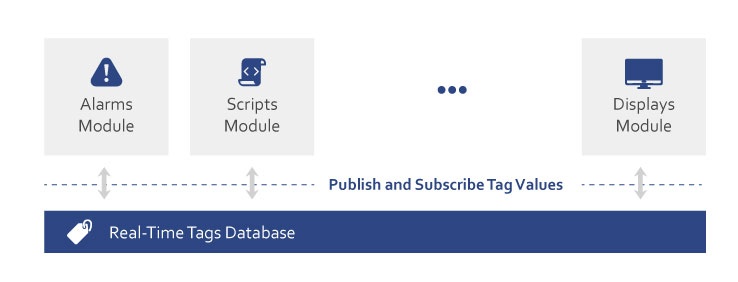
FrameworX is a Unified Automation Platform. Its main components are:
- FrameworX Core
- Designer - Unified Configuration using the Four Pillar Methodology.
- Runtime - .NET Real-Time database, with Native UNS architecture.
- Data Sources- Connectivity with 100+ devices and interfaces.
- Built-In Features - Industrial and Business Operations modules
- Client Technologies - Design once, run everywhere.
→ Learn more about Real-Time Tag Database (Concept)
→ Learn more about Unified Namespace Architecture (Concept)
Create, Design and Run your Solutions
FrameworX manages the complete Solution Lifecycle, from development through production using three integrated workspaces:
|
|
|



Execution Profiles
A single .dbsln solution can run concurrently under multiple Execution Profiles — Development, Production, Validation, and Custom — each on a distinct port and each managed independently. This lets the same configuration carry a live production runtime, a parallel validation pass, and an active development session on the same machine without interference. Profile selection drives the runtime startup row, the port, and the isolation boundary; the underlying solution definition is unchanged.
Solutions Development
→ Solutions Development - FrameworX manages the complete Solution Lifecycle, from development through production.
Deployment Scenarios
→ Deployment Scenarios:- FrameworX provides versatile deployment architectures tailored to your operational requirements.
Aim high, start simple, scale without limits.
In this section...