


FlowTimebaseDB databases
- Name: FlowTimebaseDB
- Version: 1.0.0.0
- Protocol: Proprietary
- Interface: TCP/IP
- Runtime: .NET 8.0 (Multiplatform)
- Configuration:
- Devices / Protocols
Overview
Communication Driver Information | |
|---|---|
Driver name | FlowTimebaseDB |
Assembly Name | T.ProtocolDriver.FlowTimebaseDB |
Assembly Version | 1.0.0.0 |
Multiplatform | True |
Manufacturer | Flow Software |
Supported protocols | REST API for HTTP-based standardized interaction |
Channel Configuration
There is no configuration settings necessary for this interface.
Node Configuration
PrimaryStation or SecondaryStation
The station parameters are:
- URL: Specifies the URL with port of the FlowTimebaseDB server.
- Dataset: Defines the Dataset within FlowTimebaseDB to retrieve or store data.
- Token: Specifies the token for authentication with the FlowTimebaseDB server.
- Collector: Specifies the type of Collector to be used. Each one have a specific behavior in Runtime.
Points Configuration
The address parameters are:
- Measurement: Measurement in which Tag will be assigned in FlowTimebaseDB Table.
- If Point is a Project Tag and measurement field is blank, Main TagName (Name defined in Unified Namespace → Tags) will be used.
- If Point is from TagProvider and measurement field is blank, ProviderName will be used.
- Tag: Field in which Tag will be assigned in FlowTimebaseDB Table. If blank, Tag Attibute will be used (element of default types, like Integer, Decimal, etc).
- Use Template As Custom Fields: Flag indicating if Templates which Tag belongs to will be used as Custom Fields in FlowTimebaseDB Table. Default value is true.
If Point is from TagProvider and CheckBox is true, a Field called TagProviderPath will be created with the path leading to the TagProvider asset.
- Additional Custom Fields: List of User-Defined Custom Fields, separated by comma, to map a variable in the Database.
Syntax: <FieldName> = <FieldValue>
You can add, remove or edit custom fields in the dialog window at ’+’ button.
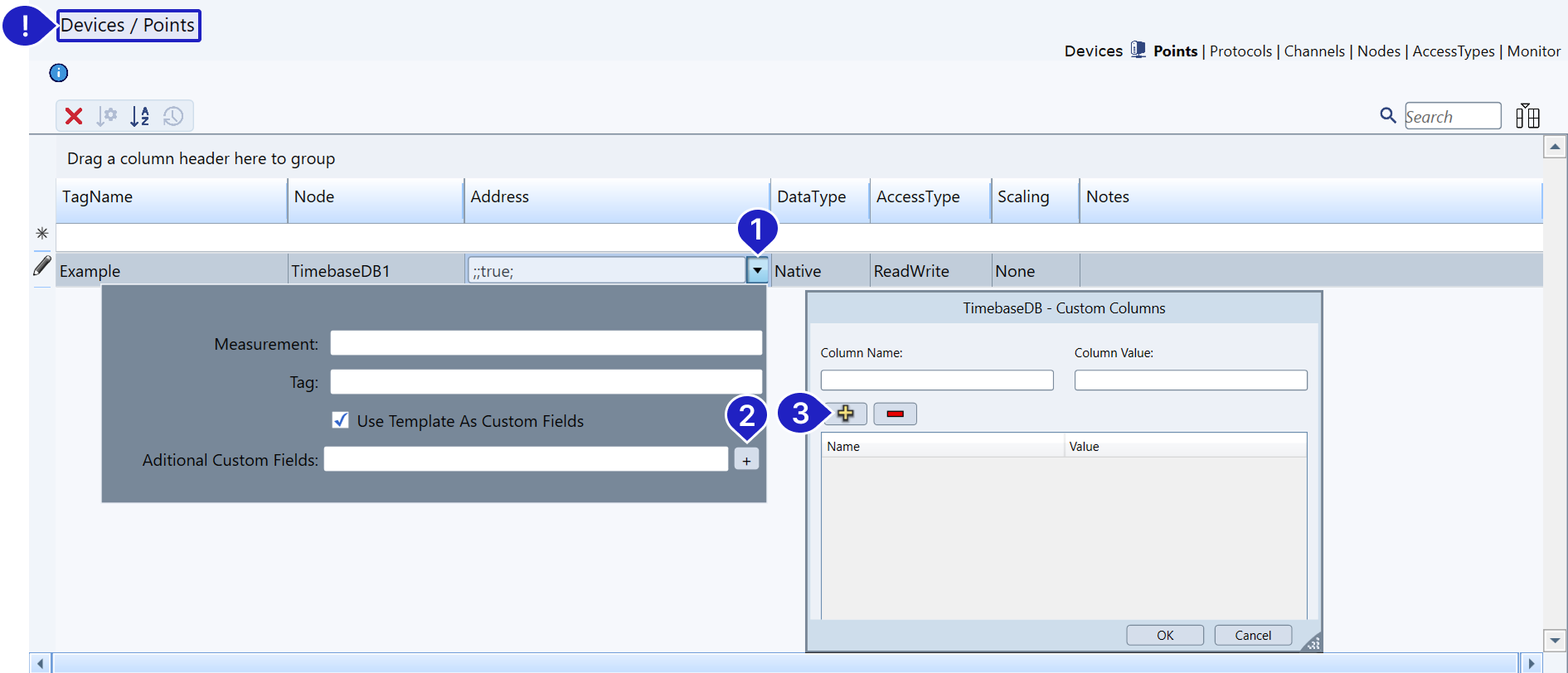
Example
To illustrate the result of a sucessfull configuration we will make the following assumptions.
- The Tags are structured as:
Motor1 [Tag of Template 'Motor']
AMP [Final Attribute of 'Double' Type]
RPM [Final Attribute of 'Double' Type]
Motor2 [Tag of Template 'Motor']
AMP [Final Attribute of 'Double' Type]
RPM [Final Attribute of 'Double' Type]
The Address is configured as for each motor:
- Measurement: ” ”. [Leave it blank so our Tag name is used].
- Tag: ” ”. [Leave it blank so our attributes are used].
- Use Template As Custom Fields: true.
- Additional Custom Fields: Owner = PC1.
This configuration will result in the following Table inside FlowTimebaseDB:

Troubleshoot
The status of the driver execution can be observed through the platform built-in diagnostic tools. Refer to Devices - Using Diagnostic Tools.
In this section...