


Monitor runtime health and resources.
Reference → Solution → Runtime → UI → Startup | Build and Publish | Execution Profiles | Monitor
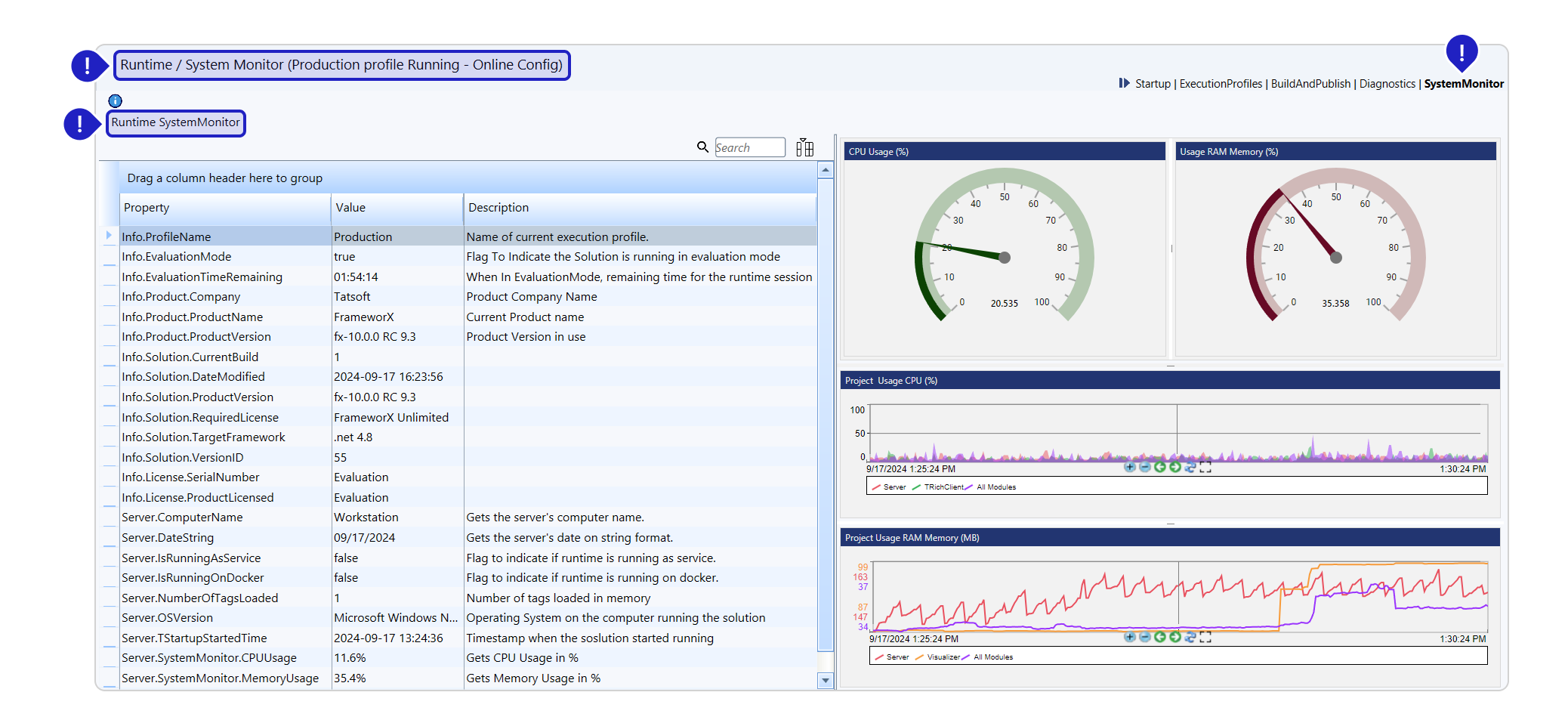
Runtime System Monitor (Reference):
Displays runtime status and system information when Designer is connected to a running solution, whether local or remote.
Access: Runtime → System Monitor
Monitor Access Methods
Designer Access
Navigate to Runtime → System Monitor when connected to runtime.
Browser Access
No installation required:
http://ServerIP:Port/html5/?Monitor=RuntimeExamples:
- Local:
http://localhost:3101/html5/?Monitor=Runtime - Remote:
http://192.168.1.100:3201/html5/?Monitor=Runtime
Port defaults: 3101 (Production), 3201 (Development)
System Information Properties
Profile and Licensing
| Property | Description | Example |
|---|---|---|
| Info.ProfileName | Current execution profile | Production |
| Info.EvaluationMode | Running in evaluation | True/False |
| Info.EvaluationTimeRemaining | Time left in evaluation | 02:45:30 |
| Info.License.SerialNumber | License serial | ABC-123-456 |
| Info.License.LicensedProduct | Product/Family/Model | FrameworX-5000 |
Product Information
| Property | Description |
|---|---|
| Info.Product.Company | Product company name |
| Info.Product.Name | Product name |
| Info.Product.Version | Product version in use |
Solution Details
| Property | Description |
|---|---|
| Info.Solution.CurrentBuild | Build number |
| Info.Solution.DateModified | Last modification |
| Info.Solution.ProductVersion | Product used for editing |
| Info.Solution.RequiredLicense | Production license needed |
| Info.Solution.TargetFramework | Platform requirement |
| Info.Solution.VersionID | Configuration version |
Server Information
| Property | Description |
|---|---|
| Server.ComputerName | Server hostname |
| Server.DateString | Current server time |
| Server.OSVersion | Operating system |
| Server.TStartupStartedTime | Solution start time |
| Server.SystemMonitor.Uptime | Running duration |
Runtime Status
| Property | Description |
|---|---|
| Server.IsRunningAsService | Windows service mode |
| Server.IsRunningOnDocker | Docker container mode |
| Server.NumberOfTagsLoaded | Tags in memory |
License Verification
Critical checks for production:
| Check | Requirement | Where to Verify |
|---|---|---|
| Evaluation Mode | Must be False | Info.EvaluationMode |
| License Match | Solution ≤ License | RequiredLicense vs LicensedProduct |
| Profile | Must be Production | Info.ProfileName |
License Warning Signs
- EvaluationMode = True
- EvaluationTimeRemaining shown
- License mismatch warnings
- Wrong execution profile
Using Monitor Data
Health Checks
Monitor these indicators:
- Uptime for stability
- Tag count for memory usage
- License status for compliance
- Profile for environment
Troubleshooting
| Symptom | Check | Action |
|---|---|---|
| Solution stops | EvaluationTimeRemaining | Apply license |
| Wrong data | ProfileName | Switch profile |
| Performance issues | NumberOfTagsLoaded | Optimize tags |
| Connection problems | ComputerName | Verify server |
Remote Monitoring
Setup Requirements
- Solution running on server
- Port accessible through firewall
- Network connectivity
- Browser on monitoring station
URL Construction
http://[ServerAddress]:[Port]/html5/?Monitor=RuntimeComponents:
- ServerAddress: IP or hostname
- Port: Runtime port (profile-specific)
- Path: Always
/html5/?Monitor=Runtime
Integration Points
The System Monitor data comes from runtime objects:
- Server object properties
- Info object properties
- Real-time values
- Automatic updates
Best Practices
Regular Monitoring
- Check uptime daily
- Verify license status
- Monitor tag count growth
- Track version changes
Production Deployment
- Confirm Production profile
- Verify license compliance
- Document system specs
- Monitor initial hours
Remote Access
- Secure monitor URLs
- Limit access permissions
- Use HTTPS when possible
- Monitor access logs
In this section...