
Work with script tasks and classes to create machine learning models.
How-to → Examples → Feature → Application → Tasks and Classes
This page is under development
Download the solution and ML models MLNET.zip.
Summary
This solution example demonstrates the basic concepts involved in using machine learning models. The algorithms presented include:
Regression
Binary Classification
Anomaly Detection
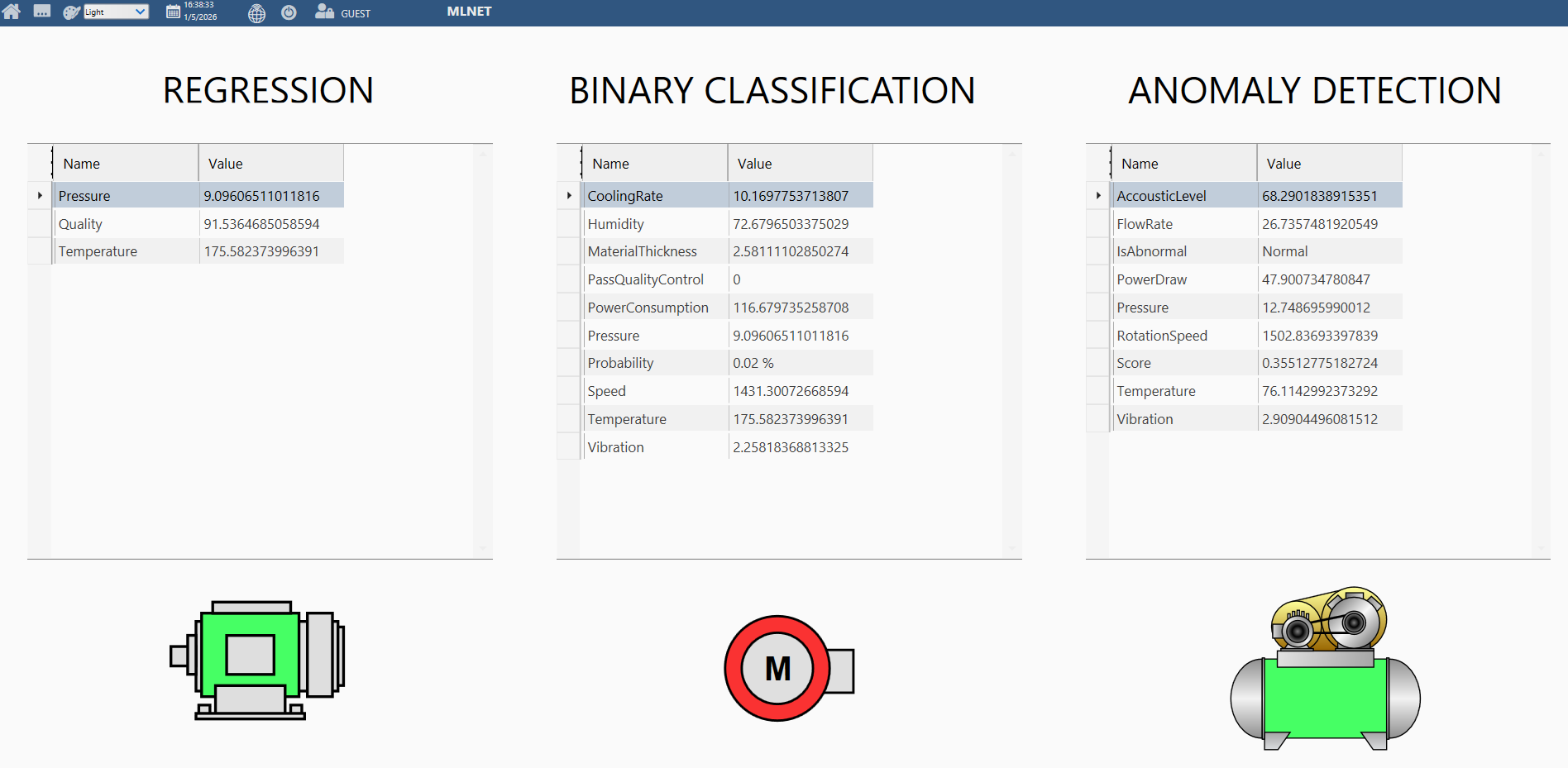
It runs machine learning models to predict the qualityIndex (Regression), determine whether the current PV values pass quality control (Binary Classification), and detect whether any anomalies are present (Anomaly Detection).
Technical Information
Requirements
.NET 8.0
Multiplatform FrameworX solution
Understanding of machine learning concepts.
In
Scripts / Classes / <AlgorithmName>, update thepathModelvalue to point to your model path (the model downloaded previously).In
Scripts / Classes, the class that contains the machine learning model must include the ML.NET dependencies. To simplify this, when creating a new class, select “Add ML.NET namespaces.”
Solution explained using The Four Pillars Methodology
The explanation below focuses only on the Regression model; however, the same logic applies to the other two models. Only the most relevant methods are described. Elements such as variable declarations are not explained in detail but can be reviewed directly in the example.
Pillar 1: Data Foundation (Unified Namespace)
Under Unified Namespace / Tags, you will find the Motor PVs, as well as the input and output tags used by the models. All members of these tags can also be reviewed under Unified Namespace / UserTypes.
The data is described in the table below:
| Variable | Direction | Description |
|---|---|---|
| Temperature | Input | Float values between 150 and 200 being generate to simulate the temperature of a machine |
| Pressure | Input | Float values between 7 and 10 being generate to simulate the pressure of a machine |
| Quality | Output | Float value representing the quality index generate from the 2 input above |
Pillar 2: Industrial Operations (Process Modules)
Under Devices, the ValueSimulator protocol is configured to simulate field data. In Devices / Points, you can view the range of random values generated for each variable in the Address column. In Devices / AccessTypes, the Read AccessType being used has a polling rate of 5 seconds; in this specific driver, this means that new values are generated every 5 seconds.
Pillar 3: Business Operations (Application Modules)
This is where the ML.NET code is implemented. In Scripts / Tasks, there is a RunMLTask, which is responsible only for calling the models and running predictions automatically.
1. In Scripts / Classes, there are three machine learning model implementations. There is also a class named RunML, which is responsible solely for invoking these models.
float quality = await @Script.Class.Regression.PreviewQuality((float)temperature, (float)pressure);
2. Load the model:
var pathModel = @"<modelPath>";
trainedModel = mlContext.Model.Load(path, out modelSchema);
3. Instance the class with the inputs:
First create the "ManufacturingQualityInputData" and "ManufacturingPredictionResult" classes.
var newManufacturingData = new ManufacturingQualityInputData()
{
	Temperature = temperature,
	Pressure = pressure
};
4. Do the prediction calling the ML.NET methods:
var predEngine = mlContext.Model.CreatePredictionEngine<ManufacturingQualityInputData, ManufacturingPredictionResult>(trainedModel);

return predEngine.Predict(newManufacturing);
Pillar 4: User Interaction (Operator UI Modules)
On the main page, you can see three tables displaying the outputs of each machine learning model, along with motor symbols below them to indicate whether the model output is considered good (green) or not (red).
Regression:
The output isQuality. A value above 80 is considered good.Binary Classification:
The outputs arePassQualityControlandProbability. A value of 1 forPassQualityControlis considered good, and a higherProbabilityindicates better confidence.Anomaly Detection:
The outputs areIsAbnormalandScore. A result of Normal is considered good. The higher theScore, the more certain the model is that the condition is abnormal.
You can always copy and paste the code into a large language model (LLM) to help you understand it. LLMs have strong knowledge of ML.NET and can be a useful support tool.
In this example, the models were pre-created in a Microsoft Visual Studio environment. The models were exported as .zip files and used directly within FrameworX. Although it is also possible to train the models inside FrameworX, all dependencies used must support .NET 8.0.
More details about The Four Pillars Methodology.
In this section...